

intro.
I go into quite a bit of detail here. If you're interested in creating your own things, you may learn a thing or two from this!
I actually started out drawing traditionally! I remember first discovering what furries were in high school 2013, making an FA account, and following a bunch of artists I liked. It was such an obsession at the time that I just felt like I needed to re-create some of my own. I started by straight-up copying other artists' works until I felt it was time to start my own stuff.
My hardware drawing setup
In 2019, I moved away from drawing strictly on a desktop with a Wacom to instead transitioning my workflow to a more portable device. I was getting sick of sitting at the same table every day and imagined, "If I transition to a portable workflow, I can take my work literally anywhere I go."
I was at first considering an iPad, but I decided to look a little further. I then discovered what Samsung offered, and I decided on a Samsung Tab S6. It had everything I wanted. I mainly chose it over the iPad purely because of how the pen feels to use, then discovering how much better Android is for file management as well (coming from an iPhone user). The Samsung pens are like slim Wacom pens with a small felt nib as opposed to a solid plastic nib.
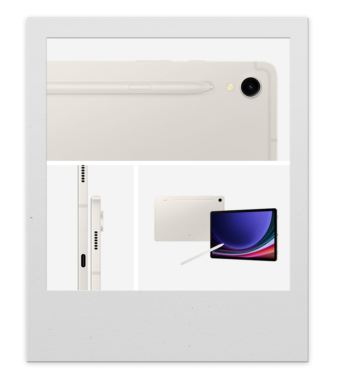
It does use Wacom's tech as well, which was a win in my book. the only downside was the latency. Though fast forward to 2025, and I now own a Samsung Tab S9. the latency is ultra low, it's waterproof, and it's fast enough to keep up with my many dozens of layers...
I highly recommend getting a Samsung tablet for portable drawing if you're a fan of Android. As a power user myself, it keeps up with my work and has now completely replaced my desktop. I create almost everything you see on it! (including my comic and the assets on this website!) It's even great for digital sculpting!
my software drawing setup
From when I started (around 2014) to 2019, I had been exclusively drawing in PaintTool SAI 2.
Though, of course, I knew when I was going to transition to a portable setup, I already knew there was no SAI on Android.
All I knew is that I wanted a change and there were more than enough drawing apps for me to choose from (even at that time; there's way more now). I downloaded almost every drawing app I could find, Hoping to find something that was at least on par with PaintTool SAI. Out of all the apps I tried and all the reviews I watched I managed to find something that had the same functions PLUS more in a less cluttered, touch based interface, and that app was ibisPaint.
ibisPaint looks simple at first glance, but it actually has more functions than most drawing software out there (at least for my workflow).
Here's some of the stand-out features in ibis:
my favourite tools in ibis are the text tool (you can install any font), being able to create custom brushed from images, the liquify tool (I use this so much I can never go back to not using it), the autosave, my god the autosave recovery is GODLY. It seems that no matter how hard you try, it's impossible to lose any progress even on unexpected shutdowns. the ONLY time I ever lost progress was when I had a finished artwork (luckily, I exported it). My tablet storage was full, AND the battery died.
I've been using ibis longer than I was using SAI at this point, and I had multiple lost jobs in SAI.
Now I know what you're thinking. "But there's infinite painter and HI-paint, and even CSP, why did you choose Ibis?
Believe me, I tried, and I still do on occasion. I like the UI design of these apps better, yes, but that's where it ends. If you want all the functions of CSP, you need to enable the cluttered interface (and it's expensive). The others either lacked a good liquify tool or a text tool.
my 3D work
I've always had an interest in 3D models since I was a kid on the PS1. They always fascinated me. but never would I have thought I would ever make my own...
I use Blender for all my 3D work. A lot of the time, it's not always furry related - I also create my own projects, like custom cases, RC car related things, cosplay props, and armour. I don't usually post these works online, but I do share them as downloadable files through other platforms...
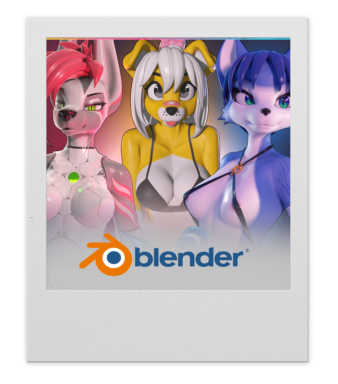
Recently, I've been creating more 3D renders of my characters specifically for drawover work. Multiple characters have never been my strength in art, so rendering them instead allows me to expand on my ideas and my characters in more intimate moments. <3
my painted sculpture work
intro
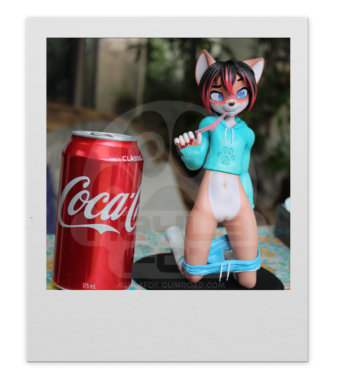
In my teenage days, my friends and I would go to Beyblade tournaments hosted at a store here called "Anime at Abbotsford". We went to them quite often and actually won most of them too! The prizes were a $100 voucher to buy anything from their shop! They had a room in the back with all the anime figures (including the spicy ones), and I just couldn't help myself... We would usually combine our vouchers and take turns buying figures for each other. Every time I went in the store, I would always dream of one day making my own.
That's how it started! Then Resin 3D printers became a thing for consumers, and I immediately jumped on it. My original resin printer was the first Anycubic Photon. I now own an Elegoo Saturn 4 Ultra.
workflow
Diving into how I create my models in pieces is a bit of a hard one to explain, but I made a tutorial on YouTube almost 10 years ago now! You can find it by clicking on my "YouTube" bubble on the left of the website.
The short explanation of my workflow is preparing the model in Blender, 3D printing the individual parts, priming, then airbrushing the colours (I always start with the light colours first)
The most painful part of this whole process, I would say, is masking off areas when painting. But this is only necessary if a single part shares multiple colours or has certain sharp patterns.